
Check the current contract and validator results before you build on this.
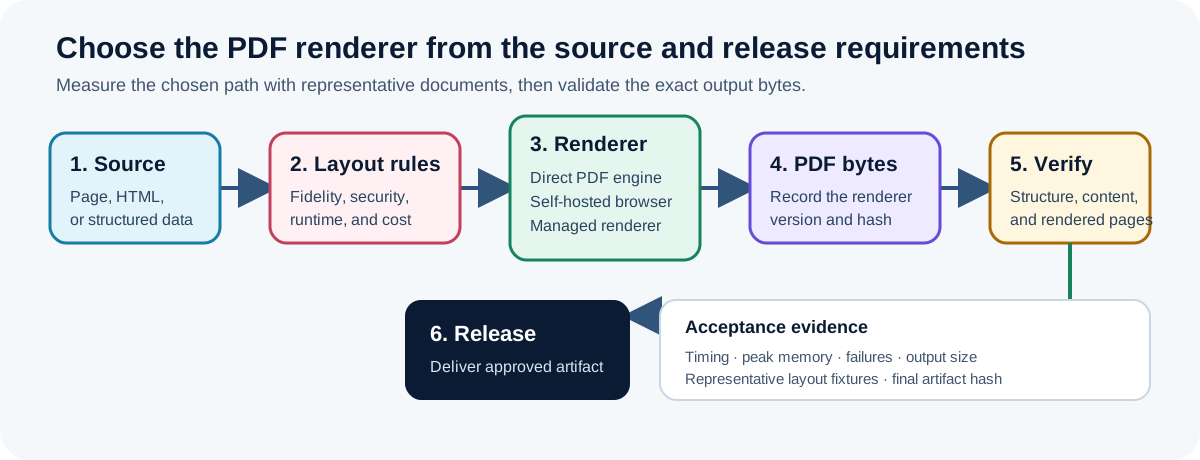
You can generate a PDF without operating Puppeteer by using a direct PDF library or a document-generation operation. Use a browser when the source of truth is an existing HTML/CSS page. Use direct generation when the source of truth is structured data and you can express the required layout in the renderer's document model. If browser fidelity is required but browser operations are not part of your service, use a managed browser or isolated rendering service.
Start with the source of truth
The right renderer depends on what you convert.
- Existing web page: Chromium's print pipeline preserves the browser's interpretation of HTML and CSS. Puppeteer's official
page.pdf()API is designed for this path. - HTML template: a browser, a paged-media engine, or a managed conversion API can apply CSS to populated markup. Test print-specific CSS separately from the interactive page.
- Structured data: a direct PDF library or schema-based renderer avoids an intermediate web page. The input can describe paragraphs, tables, images, and document metadata directly.
- Existing PDF: use a PDF transform or repair workflow. Rebuilding the document from HTML usually discards structure that could have been preserved.
This distinction is more useful than comparing package sizes in isolation. A browser is justified when browser layout is the requirement. It is unnecessary infrastructure when the document is an invoice, statement, or report whose layout already has a bounded data contract.
Option 1: generate PDF bytes directly
Direct renderers build PDF objects without launching a browser. The common interfaces are an imperative drawing API or a structured document definition.
An imperative library is appropriate when you need exact control over coordinates and page breaks. That control also means your application owns more layout logic. A structured renderer offers higher-level blocks such as text, images, and tables, but its layout vocabulary is narrower than CSS.
Runstamp exposes this boundary as the pdf.render operation. The SDK sends a validated operation input and returns an artifact plus warnings, losses, provenance, and retry guidance through a common result envelope.
import { local, Runstamp } from "@runstamp/sdk";
import { writeFile } from "node:fs/promises";

type ArtifactBytes = { bytes: Uint8Array; mediaType: string; hash: string };

const runstamp = new Runstamp({ transport: local() });

const result = await runstamp.run<ArtifactBytes>(
  "pdf.render",
  {
    meta: { title: "Quarterly service report" },
    page: {
      size: "A4",
      margin: { top: 42, right: 52, bottom: 50, left: 52 }
    },
    children: [
      { type: "heading", level: 1, value: "Quarterly service report" },
      {
        type: "paragraph",
        value: "The service processed 1,284 requests during the quarter."
      }
    ]
  },
  { operation: { timeoutMs: 20_000 } }
);

if (!result.ok) {
  throw new Error(`${result.error.code}: ${result.error.message}`);
}

await writeFile("service-report.pdf", result.value.bytes);
Treat the input above as illustrative. Use the current operation reference and generated types for the installed Runstamp version rather than copying an old payload into production.
Direct generation is a good fit when:
- the input is structured application data;
- the supported page, font, table, and image rules can be stated in a contract;
- deterministic output and explicit diagnostics matter;
- you need to validate generated artifacts before they leave the system.
It is a poor fit when the approved design depends on a browser layout feature that the document model does not expose. Do not recreate a complex web design as hundreds of drawing coordinates merely to avoid a browser.
Option 2: operate Puppeteer in the application
Puppeteer loads the document in Chromium and prints it. A minimal flow sets the content or navigates to a URL, waits for the required resources, and calls page.pdf().
import puppeteer from "puppeteer";
import { writeFile } from "node:fs/promises";

const browser = await puppeteer.launch({ headless: true });

try {
  const page = await browser.newPage();
  await page.setContent(html, { waitUntil: "networkidle0" });
  await page.emulateMediaType("print");

  const bytes = await page.pdf({
    format: "A4",
    printBackground: true
  });

  await writeFile("page.pdf", bytes);
} finally {
  await browser.close();
}
The production work sits around this snippet. Pin the browser version, install compatible system dependencies, package the fonts used by the template, bound navigation and rendering time, block untrusted network destinations, and recycle failed browser processes. Reuse policy and concurrency limits should be based on measurements from your templates and deployment environment.
Puppeteer is a good fit when an HTML/CSS page is already the reviewed source, print styling has been tested, and the deployment can support the browser process. It also works well for screenshots and browser automation, so one managed pool may serve several related jobs.
Option 3: use a managed browser or conversion service
A managed service keeps Chromium or another renderer outside the application process. Your code sends a URL, HTML, or template data and receives the PDF. Cloudflare Browser Rendering, for example, documents PDF generation through its browser APIs; a statement that PDF generation categorically cannot run with a Workers architecture would therefore be misleading.
This option can reduce packaging and lifecycle work, but it changes the boundary:
- document inputs and rendered outputs cross a service interface;
- credentials, retention, regional processing, and network failure become part of the threat model;
- concurrency and cost depend on the provider's contract;
- a provider update can change rendering, so visual fixtures still matter.
Use a managed renderer when browser fidelity is required and operating browsers is outside your product's scope. Keep direct generation inside the application when the document contract is stable and the application must retain control of the entire rendering path.
Compare the approaches with evidence from your documents
| Question | Direct generation | Self-hosted browser | Managed renderer |
|---|---|---|---|
| Primary input | Structured data or drawing calls | HTML, CSS, or a URL | HTML, URL, or provider template |
| Layout model | Library or operation contract | Browser print layout | Provider's renderer |
| Runtime ownership | Application owns the PDF engine | Application owns browser lifecycle | Provider owns renderer lifecycle |
| Network dependency | None for a local engine | Optional; depends on page resources | Required |
| Best evidence | Contract tests plus rendered fixtures | Print-CSS fixtures plus browser telemetry | Provider contract plus rendered fixtures |
| Typical reason to choose it | Structured document data | Existing reviewed web layout | Browser layout without browser operations |
Do not copy universal memory, cold-start, or package-size numbers from a benchmark into an architecture decision. Those values vary with the browser build, fonts, container, template, and reuse policy. Measure at least cold and warm generation, peak memory, output size, timeout rate, and concurrency on the environment you will ship.
Security checks apply to every path
A document renderer processes complex, often attacker-controlled input. Bound the work before rendering:
- cap HTML, JSON, image, and font sizes;
- allow-list URL schemes and outbound hosts;
- reject local-file and metadata-service access;
- set generation and download timeouts;
- isolate temporary files and delete them after the job;
- avoid executing arbitrary template code;
- record the operation, renderer version, input hash, and result status without logging sensitive document content.
For browser jobs, also disable unnecessary capabilities and intercept requests. For direct renderers, validate nested arrays and layout values so an apparently small request cannot expand into an unbounded document.
Validate the artifact, not only the API response
A successful render call proves that bytes were returned. It does not prove that every page is readable or that the intended content survived.
Run structural checks against the finished artifact. The pdf.validate operation is separate from pdf.render so validation policy can evolve independently. At minimum, verify the file signature, parseability, page count bounds, expected text or metadata, and any required encryption or accessibility properties.
Keep rendered reference pages for layouts where geometry matters. Include the longest customer name, the widest table, a missing optional image, multiple scripts, and a page break near the end of a section. Compare those fixtures after a browser, font, template, or renderer update.
For recurring output, place rendering and validation in a Document Job: capture the exact operation input, preserve diagnostics, and release the artifact only after required checks pass. This makes the browser decision one part of an auditable workflow instead of an implicit dependency hidden inside an API route.
Decision summary
Choose direct PDF generation for structured documents when its layout contract covers the approved design. Choose Puppeteer when browser print behavior is the required renderer and your service can operate it safely. Choose a managed renderer when browser fidelity is required but browser lifecycle belongs outside your application.
Whichever path you choose, pin versions, package fonts deliberately, bound untrusted input, retain representative fixtures, and validate the final PDF before distribution.
Keep the document workflow in your product.
Pick an operation, run it on a real file, then embed review and release where your customers work.